It may sound unbelievable to some, but not everyone has a datacenter beast with 128GB of VRAM shoved in their desktop PCs.
Around the world people tell the tale of a particularly fierce group of Linux gamers: Those who dare attempt to play games with only 8 gigabytes of VRAM, or even less.
Truly, it takes exceedingly strong resilience and determination to face the stutters and slowdowns bound to occur when the system starts running low on free VRAM.
Carnage erupts inside the kernel driver as every application fights for as much GPU memory as it can hold on to. Any game caught up in this battle for resources will
surely not leave unscathed.
That is, until now. Because I fixed it.
Q: I don’t care about long-winded rants about Linux graphics drivers! Where do I get moar perf?
A: You need some kernel patches as well as additional utilities to make use of the kernel capabilities properly.
The simplest option is to use CachyOS (with KDE as your desktop). Their kernel includes the patches you need from version 7.0rc7-2 and up, and the userspace utilities are available in the
package repositories. All you need to do is use CachyOS’s 7.0rc7-2 kernel, install the packages called dmemcg-booster and plasma-foreground-booster, and you should be good to go.
Q: I use another Arch-based distro! What now?
The dmemcg-booster and plasma-foreground-booster utilities are available in the AUR as well (plasma-foreground-booster carries the package name plasma-foreground-booster-dmemcg), so you can install them from there.
For the kernel side, you can either use the CachyOS kernel package on a non-CachyOS system by retrieving the package from their repository,
or you can compile your own kernel. Installing linux-dmemcg from the AUR will compile the development branch I used to develop this.
Being a development branch, this carries the risk of some stuff being broken, so install at your own risk!
If you want to apply the kernel patches yourself, you need these six .patch files:
Patch 1
Patch 2
Patch 3
Patch 4
Patch 5
Patch 6
I’m not sure how easily they apply on specific kernel versions, but feel free to leave a comment if you run into issues and I’ll try to help out.
Q: I don’t use an Arch-based distro (or the instructions don’t apply to me for some other reason)! What now?
Maybe wait a bit. Eventually I’d expect this to trickle down into more distros. If I notice this work being packaged by other distros or being installable by other means, I will update this blogpost.
Q: I don’t use KDE! What now?
A: For games where you care about VRAM usage, you can use newer versions of gamescope. Newer versions of gamescope will also try to make use of these kernel capabilities,
so running your games through that should be sufficient. You will still need the dmemcg-booster utility in any case.
Q: I don’t use systemd! What now?
A: All the user-space utilities hard-depend on systemd. Without systemd, you’d need to write your own utilities that make use of my kernel patches.
Something needs to manage cgroups in your system, and that something needs to enable the right cgroup controllers and set the right limits (see also the long-winded explanation about how this works).
Q: I do care about long-winded rants about Linux graphics drivers! How does this work?
Let’s first look at what problems we actually run into when we have games running on GPUs with little VRAM.
On a standard desktop system, the game won’t be the only application that runs on the GPU at a time at all. If it’s anything like my system, there’s always at least one browser window with way too many tabs open,
plus an assortment of apps (many of which are actually web apps running in their own browsers under the hood). All of this eats up quite a bit of VRAM, as well.
To properly stress-test kernel memory management when working on this issue, I would go ahead and open up nearly every app with an integrated browser engine that I had installed. Viewed in amdgpu_top, the result
of that looks something like this:
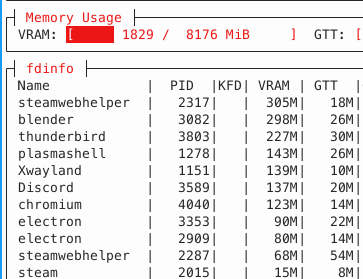
Ouch, there goes 1/4 of VRAM. Now, let’s try and launch Cyberpunk 2077 on top of that:
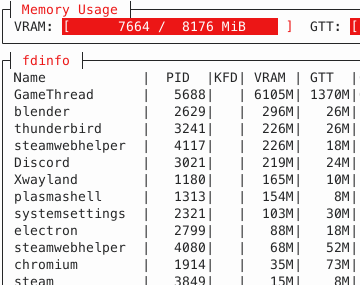
As expected, the game uses a lot of VRAM (I cranked the settings really high). However, a lot of memory allocations also end up in a memory region referred to as “GTT”. This is memory that is accessible by the GPU, but physically located in system RAM.
From the GPU’s point of view, system RAM memory has to be accessed over the PCI bus. Accessing memory over the PCI bus is typically really, really slow. On my system, instead of the 256GB/s bandwidth VRAM could provide, we’re suddenly
stuck with a meager 16GB/s at absolute maximum, paired with significantly worse latency.
Some amount of memory landing in GTT is normal - many games will intentionally allocate memory in GTT because it is advantageous for some use cases. However, Cyberpunk 2077 allocates a fixed amount of around 650MB of memory in GTT.
Instead, what happened here is that the game requested some memory allocations in VRAM, but somehow, they ended up in GTT instead!
In kernel land, this process is referred to as eviction. The system in total tried to use more VRAM than there was available at all, so something had to give. Instead of telling the app that memory allocation failed (which would mean a near-certain application crash),
the kernel decides to kick some memory out of VRAM to make everything fit. This degrades performance, but at least it allows every app to continue running. Nice! If only it would evict literally anything other than the game, which is the very thing that suffers the worst from having its memory evicted.
Why in the world would it decide on that????
A brief history on kernel eviction policies
Memory eviction and behavior under VRAM pressure are by no means new issues. Over the course of time, different approaches have tried tackling different associated issues, and those different approaches introduced new issues themselves.
In the beginning, things worked rather simplistically: If applications wanted VRAM allocations, the user-mode driver would go to the kernel-mode driver and request VRAM memory.
Save for some exceptional cases, that request would be granted, and that memory would be kept in VRAM. If another application requested VRAM allocations, and the memory was kicked out, the kernel driver would move the memory back into VRAM the next time
work was submitted to the GPU using that memory.
This worked quite horribly. Generally, two competing applications can be expected to roughly take turns executing GPU work - first one application submits work, then the other, then the first again, and so on.
With that approach, memory would keep being moved back and forth after every single submission. One application gets kicked out and immediately moved back in, kicking the other out (which moves memory back in the next step). All this moving ended up with
worse performance than if the memory had never been moved in the first place.
The first bandaid solution was to rate-limit memory movement inside the kernel driver. Once the kernel driver moved enough memory within a specific time frame to trigger a limit, no more memory would be moved for some more time.
This indeed reduced moves, but didn’t do anything to fix the underlying issue of repeated cyclic memory movements. Worse yet, repeatedly running into this ratelimit would introduce annoying jitters and stutters as the kernel driver rapidly alternated between moving memory and doing nothing.
Eventually, to combat the still-existing overhead of repeatedly moving memory, user-mode drivers changed their allocation strategy. Instead of specifying VRAM as the only acceptable domain to place the allocation in, every VRAM allocation request would specify both “VRAM” and “GTT” as possible memory domains.
The kernel would interpret this as VRAM being preferred, but if there was no space, GTT was an acceptable fallback and the kernel wouldn’t try to kick out other VRAM memory to make space.
This change entirely stopped the issue with memory repeatedly moving in and out of VRAM. However, if you squint your eyes a bit, you can see the kernel conceptually performing an eviction here, too. If there is no space in VRAM, the newly allocated memory is immediately evicted.
This “eviction” is incredibly cheap to perform, since you don’t actually need to move any memory, but the result is all the same: Memory that would ideally be in VRAM ends up in GTT.
This case is what we run into in Cyberpunk 2077 above. At some point, VRAM is full, and new allocations done by the game go straight to GTT. Clearly, that is the wrong decision to make here. But being more aggressive wouldn’t really work either - that was the approach before, and it was even worse.
So what is the right decision here?
Making the right decision is impossible
There is no single right decision to make here. Being aggressive is wrong, and not being aggressive is wrong, too. To be more specific, they’re wrong in different cases. It makes complete sense for a game to be aggressive, but it makes no sense for random background apps to be equally aggressive.
Random background apps should not be aggressive at all, but if the game backs off equally quickly, that doesn’t help much either.
The real problem is that to the kernel driver, all memory looks the same. The kernel doesn’t know if it’s dealing with a highly-important object from a game or a static image from a random web app running in the background - all it sees is a list of buffers. As long as all buffers look the same,
it is impossible to have the same approach work well for every one of all the wildly different situations a driver may encounter.
Enter cgroups
cgroups are cool. They’re super great at organizing random batches of processes into single organizational pieces. If you make a “compile job” cgroup and put the make process in it, all compiler processes it spawns will be part of that cgroup too.
Don’t want a big build hogging up all your RAM? Set a limit with the cgroup memory controller. Want to have some CPU time for other things? Just set a CPU limit with the cgroup cpu controller. It’s great. You can have cgroup hierarchies too, and represent almost any kind of complex resource
distribution you want.
Luckily, systemd agrees that cgroups are cool. Every systemd unit is actually represented with its own cgroup, as well. And, as it happens, desktop environments will represent each desktop app as a systemd unit.
How convenient! Complex resource distribution sounds exactly like the problems we’re having in GPU driver land. If only someone wrote a cgroup controller operating on memory allocations from arbitrary devices such as GPUs…

cgroups are a very clean solution for figuring out how relatively important GPU memory allocations are.
Some time after Maarten Lankhorst from Intel initially wrote a cgroup controller managing GPU memory (initially only made for limiting how much VRAM one cgroup is allowed to consume), he pointed me to this work as a
possible solution for the VRAM issues I was investigating. Eventually, this resulted in the dmem cgroup controller, written by Maarten, Maxime Ripard from Red Hat, and me.
With the dmem cgroup controller, the kernel now learns about “memory protection”. Memory being “protected” merely means that the kernel will go to significant lengths to avoid evicting that memory. For example, it may try to find memory from a different cgroup that is not protected and evict that instead.
cgroups are all about resource partitioning, so for a cgroup, you can assign a “protection limit” - that is, if a cgroup’s memory usage is below that limit, its memory is protected. As soon as it exceeds the limit, the memory ceases to be protected and can more easily be evicted.
This roughly corresponds to the “more aggressive” and “less aggressive” behaviors we used to have, but now we can have some applications (=cgroups) that are more aggressive and some that are less aggressive. Precisely what we wanted!
A note about my kernel patches
The dmem cgroup controller has been upstream for a while now, but for memory protection to work properly in gaming scenarios and such, you will likely still need my kernel patches.
Remember how Cyberpunk 2077 ends up with its memory in GTT because the kernel driver sees that VRAM is exhausted and puts new memory in GTT right away? I argued this is conceptually equivalent to an eviction, but under the hood,
this and real evictions that move existing memory from VRAM to GTT work very differently. Among other things, protection by dmem cgroups did not apply to these “evictions” - this is what my kernel patches fix. Without them,
the kernel is still not aggressive enough even if there is protection, and allocations will still end up in GTT.
User-space configuration
Maybe the best thing about cgroups for VRAM management is that the prioritization is completely dynamic and configurable by userspace.
Window managers can now determine whichever app is in the foreground and dedicate the highest priority to that app via its cgroup, completely without having to teach the GPU driver what a “window” or “foreground” is.
For desktops, this is an important heuristic, but it’s totally not the kernel’s business to know the concept of a foreground app.
I personally use KDE Plasma as my desktop environment, so I went looking for how such a thing could be integrated into Plasma. Lo and behold, it was already done! Plasma people already developed the
ForegroundBooster utility that listens to which app is currently in the foreground, and tries to give it higher prioritization (in this case: wrt. CPU time)
than other apps. This prioritization was also done via cgroups, so adding VRAM prioritization in my fork was pretty much a walk in the park.
Except for one thing - the ForegroundBooster utility doesn’t manage cgroups and cgroup properties directly. systemd is responsible for managing cgroups, so ForegroundBooster just communicates with systemd to set the cgroup properties.
That’s not too bad though, let’s just implement support for the dmem cgroup controller in systemd, right?
Well, this is what I thought, too. But as I alluded to before, fixing VRAM management for gaming purposes is by far not the only possible purpose of dmem cgroups. There are quite a few other use cases that people are eyeing dmem cgroups for, and
if I were to implement a systemd interface while only considering the gaming scenario, the other use cases run the risk of having to deal with a systemd interface that wasn’t designed with that use case in mind at all. So for now, a common systemd
implementation seems mostly off-limits until the dust has settled some more.
What do we do if we can’t tell systemd to do the thing we want? That’s right, we do it anyway, but behind systemd’s back. (Sorry, systemd.)
This is what the final piece of the puzzle, dmemcg-booster does (safely and 🚀blazingly fast🚀). After systemd constructs the cgroup hierarchy, dmemcg-booster goes over those cgroups and additionally enables the dmem controller on them, in order to activate the kernel functionality
that ultimately allows for GPU memory protection on those cgroups. While at it, it also sets some settings in the cgroup hierarchy that allow the memory protection to kick in properly.
Of course, this is a rather ugly stopgap. Once systemd gains proper support, you’d express all this with drop-in unit configurations, which is a much prettier approach. The dmemcg-booster utility is exclusively there to bridge the gap until that proper support happens.
Conclusion
With all the puzzle pieces finally in place, let’s repeat our test from before, launch a bunch of heavy apps, and then play Cyberpunk 2077 on top of that. How does it look now?
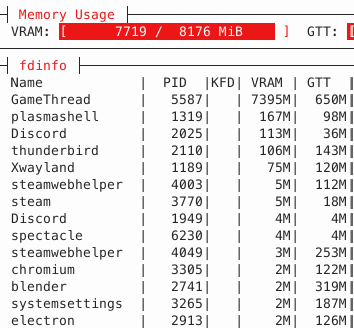
GTT memory usage is now down to 650MB, i.e. only the memory that the game explicitly allocated in system RAM itself. Not a single piece of memory got spilled!
Prioritization via cgroups now allows the game to use pretty much every last byte of VRAM for actual gaming purposes. It’s a bit hard to compare precise numbers on how the game performs, because the VRAM shortage slowly develops
over time as you run around in the game, but the improvement should be obvious when comparing how games feel when you play them for a while. Instead of performance slowly degrading over time,
games should perform much more stable - as long as the game itself doesn’t use more VRAM than you actually have. Generally, it seems like even modern games stay within a memory budget of ~8GB or a bit less, so
if you have a GPU with 8GB of VRAM, you should be good to go with today’s games.